Thought
Business
How we built our company knowledge base: structure, content types, and software that actually get used
A knowledge base survives when four choices are deliberate: who it's for (defines the structure), what goes in it (framework, resource, use-case, principle), how it's organized (by team and content type, not by chronology), and what software hosts it (search, permissions, linking, and integration). Most KBs die because one of these four was an afterthought.
Why most company knowledge bases fail
Most teams we meet have either started and abandoned a knowledge base, or have one that technically exists but nobody opens. The pattern is consistent enough to predict.
The KB starts with energy. A champion on the team decides the company needs one. A platform gets picked. The first few weeks see enthusiastic contributions: process docs, how-to guides, onboarding materials. Then other priorities return. Nobody updates the docs. New teammates arrive and still ask the same questions in Slack instead of searching the KB. Search returns outdated results. Within six months, the KB is a graveyard of stale documents, and people have silently concluded that it's not worth checking.
The interesting question isn't "should we have a knowledge base?" Almost every team benefits from one. The interesting question is "how do we build one that doesn't end up in the drawer?"
From our experience building and maintaining SUFFIX's KB over years of operation, the answer comes down to four deliberate choices. Get these right and the KB compounds over time. Get any of them wrong and the KB decays regardless of how good the platform is.
The four design choices
1. Who is the knowledge base for?
The first and most important question. Who's supposed to read this, and what are they trying to do when they open it?
For an internal KB, the audience is usually the team (current members plus future hires). For a customer-facing KB, the audience is users or clients needing self-service answers. The two require different structures, different tone, and different update rhythms. Don't try to build one KB that serves both.
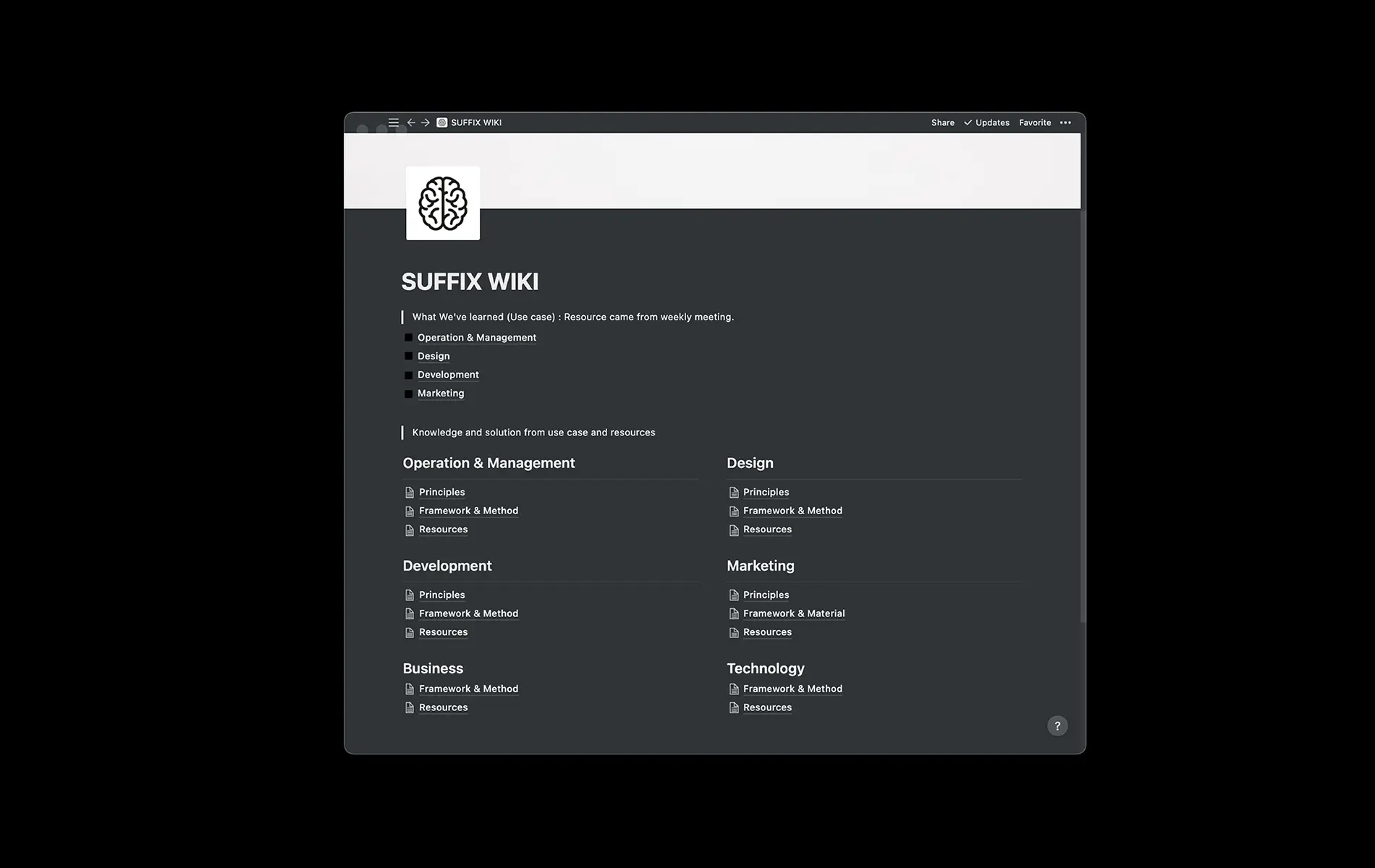
At SUFFIX the audience is internal. The KB is designed so that team members across four business units can find what they need quickly:
- Operations and Account Management for coordination teams
- Design for UI/UX and graphic designers
- Tech Development for front-end, back-end, and QA
- Marketing for strategic planners, media planners, optimizers, and content editors
Each unit has its own top-level space, within which content is organized by the four content types below. This structure means a developer doesn't wade through design docs looking for a back-end pattern, and a marketer doesn't need to filter out technical architecture content to find a campaign framework.
Clear audience also means clear exclusions. Our KB is not for client-facing documentation (that lives elsewhere), not for active project files (those live in project folders), and not for sensitive data like contracts or pricing (those are handled under stricter access controls).
2. What content goes in it (and what doesn't)
A KB is only as useful as the quality of what's in it. Everything captured is a signal to future readers that this is worth their attention. Low-quality content trains the team to ignore the KB.
We organize content into four types. Each type lives in a named section of the KB. Anyone on the team can tell what kind of content they're reading by where it sits.
Framework: Reusable ways of thinking. How we approach design systems. How we choose a tech stack. How we structure a campaign brief. Frameworks are stable references the team returns to repeatedly. They change slowly and deliberately.
Resource: External references worth bookmarking. Industry reports, research papers, guidelines from standards bodies, well-curated third-party content. These aren't our original thinking, but they're valuable enough that we want them discoverable rather than lost in individual bookmarks.
Use-case: Real project situations with what happened and how we handled it. The time a client's Google Analytics setup conflicted with the migration. The time the first design direction missed the brand's actual audience. The time a tight timeline forced a specific trade-off we hadn't faced before. Use-cases are the institutional memory of problems already solved, so the next time someone faces a similar situation, they have a reference point instead of starting from scratch.
Principle: The rules we've arrived at by noticing patterns across many use-cases. Principles emerge when the same kind of lesson shows up enough times that it deserves to be articulated as a standing guideline. "Default to the least access that lets someone do their job" is a permissions principle we derived from enough incidents to make it standing policy.
What we deliberately keep out: Not everything belongs in the KB. Personal notes that aren't useful to others. Ephemeral chat logs. Full meeting transcripts (summaries yes, transcripts no). Outdated process docs that should have been archived or removed. Anything that's already better captured in another system (source code belongs in version control, not the KB; design files live in the design tool). A focused KB is more useful than a comprehensive one, because readers trust the content when they know it's been filtered for relevance.
3. How is it structured?
The two axes that matter: by audience (who needs this) and by content type (what kind of content is it). Together they form a matrix that makes anything findable in two clicks.
Our structure:
- Top level: four business units (Operations, Design, Tech, Marketing).
- Within each unit: four content types (Framework, Resource, Use-case, Principle).
- Within each content type: actual documents with descriptive titles.
Cross-unit topics (things that matter to everyone, like our remote work operating model) live in a shared "Company-wide" space at the top level.
The structures we deliberately avoided:
- Chronological organization. Filing by date means newest content obscures older but still valid material. Search replaces chronology better than chronology replaces search.
- One giant list of all articles. Impossible to navigate past 50 items. Collapses into a search-only interface, which defeats half the purpose of a structured KB.
- Project-based folders as the primary hierarchy. Projects end. Content still needs to be referenced after the project closes. Organize by discipline and topic, not by the project it originated from.
The rule of thumb: a teammate looking for something they've never seen before should be able to find it in under 30 seconds. If they can't, the structure is wrong, not the content.
4. What software hosts it?
The tool you choose matters less than the four previous choices, but it does matter. Software that doesn't support the way the team needs to work kills KB adoption regardless of how well the content is curated.
What to look for:
Search that works: Full-text across all content types. Handles tags and metadata. Returns results in under a second. If the tool's search is bad, the KB is functionally dead from day one.
Permission granularity: Page-level and section-level access control. Private spaces for sensitive content, public spaces where needed (e.g., onboarding materials that a new hire needs before they sign the NDA).
Linking between pages: Knowledge is connected, so the KB has to support linking. Backlinks (see which pages reference this one) are a strong signal of platform maturity.
Version history: The ability to see how a document evolved. Not always used, but essential when it is.
Multiple content types: Text, tables, embeds, databases. The tool should handle the full range of what the team needs to document.
Integration with your stack: Can it pull in data from your project management tool, your chat, your code repository? Not required, but valuable when available.
At SUFFIX we use Notion. It matches our criteria: strong search, page-level permissions, robust linking, rich content types (text, tables, databases, embeds), and a free tier that scaled reasonably with our team. Common alternatives that cover similar ground: Confluence (stronger for larger enterprises and teams in the Atlassian ecosystem), Coda (more flexible for building structured databases), Dropbox Paper (lighter weight, stronger for teams in the Dropbox ecosystem), Slite (focused specifically on team wikis).
The platform choice should follow from the four design choices above, not lead them.
The retroactive compilation problem (start early)
One lesson we'd offer any team considering a KB: start earlier than you think you need to.
SUFFIX has recorded written communication since 2010, across multiple platforms (Basecamp, Teamwork, Slack, Asana, Google Chat, Email, and internal tools). When we decided to build a formal KB, we went back through years of this archive, pulled out the use-cases and frameworks that mattered, and organized them into structured documents. That retroactive compilation works, but it's expensive. Years of communication produce a large pile to sift through, and much of what gets filtered out is still useful context, just not structured enough for a KB.
Starting earlier means capturing knowledge as it happens. A use-case written the same week the situation unfolded is sharper than one reconstructed two years later. A framework captured when the team first articulated it is more accurate than one assembled from fragments.
For small teams, this is the clearest argument for starting the KB now rather than "when we get bigger." The retroactive cost scales faster than the forward cost. Writing a use-case the day you solve the problem takes 15 minutes. Writing it two years later takes a few hours and produces a less useful document.
Signs your knowledge base is working
A KB's success is behavioral, not structural. You can't tell by the number of pages or the depth of the hierarchy. You tell by how the team uses it.
Signals that the KB is working:
- Team members check the KB before asking colleagues. This is the most important signal. If people still default to DMs, something in the KB is broken (search, structure, or content quality).
- Onboarding time drops noticeably. New teammates ramp in weeks instead of months, because the context they need is already written down.
- The same questions stop being asked repeatedly in team channels. Someone asks once, gets pointed to the KB page that answers it, and the question doesn't come back.
- Multiple team members update the KB organically, not just one designated owner. If the KB has a single maintainer, it will decay when that person leaves or gets busy.
- Principles and frameworks get referenced in real decisions. "Per our remote work principle..." in a Slack thread is a sign the KB has become load-bearing for how the team operates.
Signals that the KB is failing (so you can fix it):
- New teammates still need a tour to understand anything. The KB exists but doesn't replace the tour.
- Content is visibly stale. Old process docs nobody has updated. Policies that contradict current practice.
- People write long explanations in Slack instead of linking to KB pages, even for standard topics.
- Only one person ever updates it.
The quarterly audit we run: spot-check a random 10% of pages. How many are still accurate? Outdated pages get updated or archived. Missing topics get flagged for someone to write.
The core takeaway
Human memory is finite and gradually distorts over time. Company memory, left in individual heads, is worse: it walks out the door when people leave, and it bends based on who's telling the story. A knowledge base is how we convert fleeting individual memory into durable shared institutional memory.
Done well, the KB becomes the scaffolding for how the company works. New teammates onboard faster. The same problems don't get solved twice. Frameworks get refined rather than reinvented. Principles survive individual turnover. The team gets to build on yesterday's thinking instead of starting over.
The four choices (audience, content, structure, software) aren't a one-time setup. They're commitments the team keeps living by: keeping the KB focused on its audience, filtering content for quality, maintaining the structure, and upgrading the software when it stops serving the team. Knowledge bases that survive aren't the ones with the most content. They're the ones where all four choices stayed deliberate as the team grew.
FAQ
Should a small team invest in a knowledge base early?
What content belongs in a company knowledge base (and what doesn't)?
How do I keep a knowledge base from becoming outdated?
How do you know if your knowledge base is actually working?
Writer
Director
Jate Saitthiti